
Best HRMS Software in India
Core HR Software Works as a Backbone of Your HR
factoHR is a cloud based HR software that gives your HR team a single, reliable way to manage employee data, workflows and documents so you can reduce manual work, stay organized, and manage every stage of the employee lifecycle with confidence.


4.9 Rating on Google

Years of
HR Expertise

4000+ Businesses Trust factoHR as Their HRMS Provider
Employee experience that scales as your organization scales.
0
Employees
0
HR Leaders
0
Customers
0
Countries




















What is HR Software?
HR software is a digital platform that helps organizations manage employee data and automate HR processes such as payroll, attendance, leave, recruitment, onboarding, and performance management. It reduces manual work, improves accuracy, and keeps core HR activities connected in one system.

Manage every Employee Journey from Onboarding to Offboarding
Keep employee data, documents, approvals, and important actions connected at every stage. factoHR gives HR teams one reliable system for managing the complete employee lifecycle.
Preboarding
Give new employees a smooth start before their first working day. So employees joined prepared while HR spends less time collecting information manually.

Onboarding
Create a structured and consistent onboarding experience for every employee to give them an organized experience without paperwork or missed tasks.

Employee Management
Maintain accurate employee information throughout the employment lifecycle so HR gets complete and dependable employee record.

Transfers and Promotions
Make workforce changes traceable, consistent, and properly authorized.

Employee Engagement
Keep employees informed, connected, and involved throughout their journey. Employees remain informed while HR gains timely feedback and confirmation.

Offboarding
Manage resignations, clearances, handovers, and settlements through a controlled process. Employee exits become organized, transparent, and easier to complete on time.

When Employee Data is Scattered, Every HR Process Slows Down
Employee data often gets distributed across spreadsheets, emails, and disconnected systems it slows down every HR process becomes increasingly difficult to maintain. factoHR brings your employee information and HR operations together in one reliable system.
- Employee data stays scattered across spreadsheets, emails, and files.
- The same employee details are entered repeatedly across HR processes.
- Approval requests get buried in emails and messages.
- Employee documents and policies become outdated, incomplete, or difficult to locate.
- Reports require manual preparation and often reach stakeholders late.
- Employee information is maintained in one centralized database.
- Connected employee information supports onboarding, workflows, documents, and reporting.
- Configurable workflows route requests through defined approval levels.
- Digital records, letters, and policies stay organized in the cloud.
- Dashboards present current workforce and attrition trends.
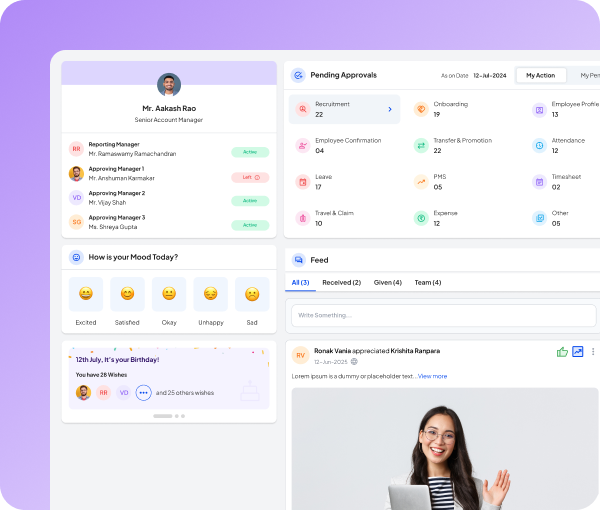
HRIS Software
Centralized Employee Database
Centralized Employee Database acts as a single source of truth, unifying all employee records across the entire workforce lifecycle within a secure, cloud-based platform.
Complete Employee Profiles
Maintain personal details, contact information, qualifications, nominations, address records, and past employment history in one structured profile for every employee.
Flexible Employee Classification
Create unlimited categories based on department, location, designation, grade, or employment type, and organize your workforce exactly the way your business operates.
Granular Access Permissions
Define role-based access so employees, managers, and HR administrators view only the employee information relevant to their responsibilities.
Employee Data Revisions
Track changes made to employee information and view both the previous and revised values with timestamps, giving HR a clear history of every update.
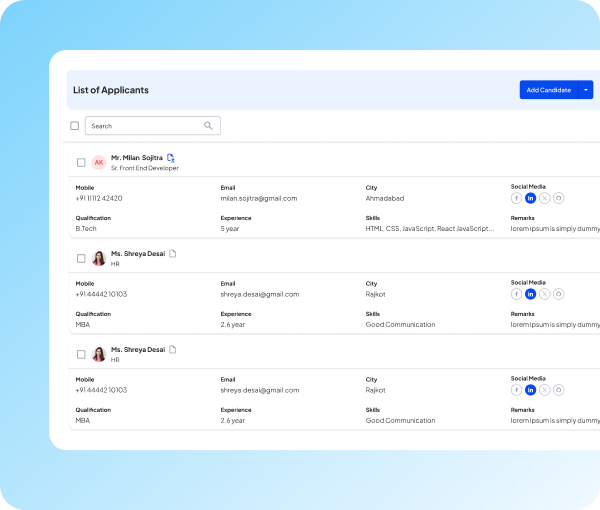
Onboarding Software
Paperless Onboarding and Document Management
Give every new hire a structured digital joining experience and keep employee documents, letters, and approvals organized in one secure cloud platform.
Employee Self-Onboarding
Send an invitation link to new joiners and let them submit their own personal, employment, and nomination details before their first working day, with minimal support from HR.
Cloud Document Management
Store and manage all essential employee documents on the cloud, and let employees access their own documents anytime through the web portal and mobile app.
Approval-Based Verification
Route employee information and document submissions through workflow-based approvals so only verified and accurate records enter the system.
Automated Letter Generation
Use dynamic templates with automatic data population to generate offer, appointment, confirmation, appraisal, and experience letters without manual drafting.
Instant Letter Sharing and Notifications
Distribute generated letters to employees by email and notify recipients immediately, so important communication reaches them without delay.

Meet Fia AI Your Everyday HR Assistant
Fia AI is factoHR’s built-in AI assistant. It answers employee questions, drafts HR documents, and helps HR team complete everyday work faster.

Policy Answers
Ask any policy question and get answers drawn from your own HR documents.

Fia Chatbot
Get instant answers on leave, payroll, policies and more, 24/7.

HR Letters
Generate accurate, compliant HR letters in just a few clicks.
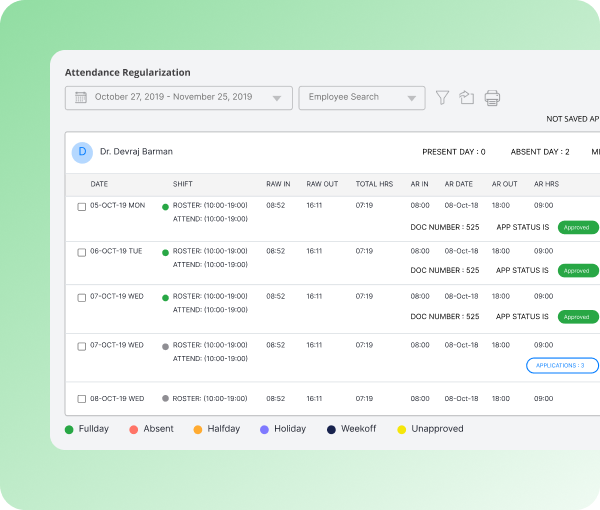
Workflow Software
Maker-Checker Approval for Employee Data
When employee information is added or updated, the change is not saved directly. It goes to the HR team for checking, so wrong entries never reach your records or payroll.
Multi-Level Approval Workflows
Set as many verification levels as your policy requires. A change can go to the reporting manager first, then to HR, before it is saved.
Employee Data Change Requests
Employees raise address, bank, or nominee updates themselves. HR approves, and the record updates automatically.
Automatic Notifications
Approvers are alerted the moment a request reaches them, and employees are informed as soon as a decision is made.
Complete Approval History
Every approval is stored with the approver’s name, date, and time, so audit questions are answered from the system itself.
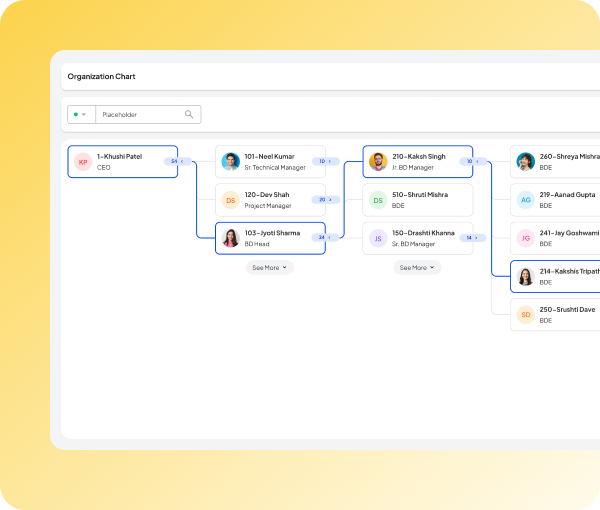
Org Chart Software
Interactive Organization Chart
Most companies keep their organization structure in a PowerPoint or Excel file that goes out of date within weeks. factoHR builds the organization chart from your live employee data, so it stays updated as people join, move, and leave.
A Structure that Updates Itself
The chart is generated from employee records, not maintained separately. Every joining, transfer, promotion, or exit is reflected on its own, so nobody has to redraw a slide.
Search Anyone and See Their Full Reporting Line
Search an employee by code or name and the chart highlights their complete reporting line, from the top of the organization down to them. You know exactly where a person sits without tracing the structure manually.
Expand or Collapse Any Team
Open a manager’s box to see everyone working under them, and collapse it once you are done. Large structures stay readable because you only view the part you need.
A Focused View for Every Department
Pull the chart for a single department when planning a review, a restructure, or a budget discussion, instead of working through the entire company structure.
Easy to Share Outside the System
Export the chart as a PDF or Excel file, with or without employee photos, so leadership, auditors, and new joiners can see the structure without needing a login.

Position Management
Position-Based Workforce Planning
factoHR lets you define every position in your organization with its own headcount and budget, so you always know what is filled, what is vacant, and what it costs.
Plan by Position, Not Just by Person
Create positions with a defined employee count and budget per employee. The position stays in your structure whether or not somebody is currently in it, so your plan does not shift every time someone resigns.
Know What is Filled, Vacant, and on Notice
One screen shows active, vacant, and inactive positions along with employees serving their notice period.
See Manpower Cost before You Spend It
Compare the planned budget against actual salary cost for any position. The variance is shown for each employee, based on the latest salary data in the system.
Turn a Vacancy Into a Hiring Request
Raise a manpower requisition directly from a position. The job title, requesting manager, and categories are filled in automatically, including whether the role is new or a replacement.
Exit Management
Exit Management and Employee Offboarding
An employee exit moves through resignation, approval, notice period, handover, clearance, feedback, and exit paperwork. factoHR runs these steps in one place and shows where every exit currently stands.
Resignation, Approval, and Withdrawal
Manage employee resignations from submission to approval with factoHR’s exit management. Employees can resign via self-service or mobile, while HR can track, withdraw, or revoke resignations all in one place for faster, smoother exit management.
Exit and Clearance Checklist
factoHR allows you to create the handover checklist in the system according to your process and assign responsibility for verifying each item to the reporting manager or HR. Clearance is recorded against the employee rather than tracked outside the system.
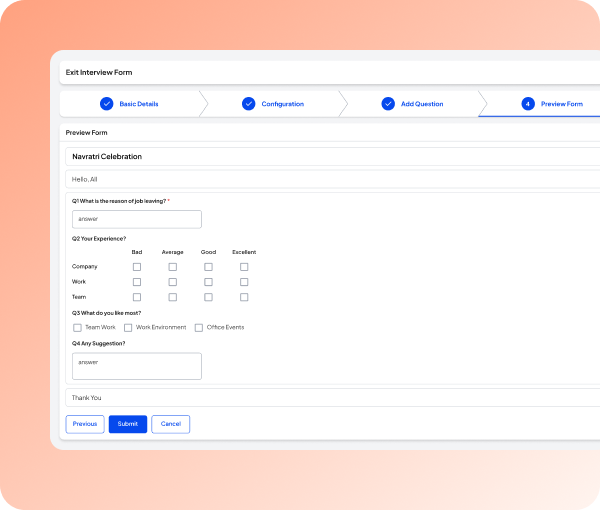
Configurable Exit Interview Form
With factoHR, you can create customized exit interview forms, configure when and to whom it will be sent, and set notification and visibility options. Also track exit interview status, employee exit details, and download individual responses or export them to Excel.
Service and Clearance Letters
Generate service letters and final clearance letters directly from exit records. HR can save time, avoid duplicate data entry, reduce errors, and ensure accurate, consistent documentation for every employee exit.
Mobile App
Core HR in Every Employee’s Pocket
Give employees one convenient HR experience on web and mobile while reducing routine work for HR.


Employee Self-Service
Employee Self-Service and Communication
Employees should not have to email HR for a document, a policy, or a status update. factoHR gives every employee direct access to their own information on web and mobile, and gives HR one channel to reach them.
Employee Self-Service Access
Employees view their information, documents, and letters and raise requests on web or mobile. Routine queries stop landing on HR’s desk, while record changes still pass through approval.
Policy and Document Sharing
Share policies through the mobile app so employees always see the current version. HR stops re-circulating attachments after every update.
Event and Approval Notifications
Send approval, birthday, and work anniversary alerts by email or push notification. HR keeps everyone informed without manual follow-ups.

Employee Engagement
Turn Employee Responses Into Action
Collect timely feedback, get confirmation on important updates, and understand how employees feel. factoHR gives HR practical ways to listen and employees convenient ways to respond.
Custom Acknowledgement Campaigns
Request confirmation for policy updates, compliance & statutory updates, and other important matters. Make campaigns compulsory or optional, define actions such as accept, decline, or skip, track response statistics, and let employees respond through the mobile app.
Employee Surveys
Create confidential or non-confidential surveys with short answers , paragraph, multiple-choice, checkbox, date, and time questions. Target participants by employee category so HR collects relevant feedback from the right groups.
Everyday Employee Mood Survey
Employees share whether they feel excited, motivated, satisfied, detached, demotivated, or unsatisfied. HR gets a more immediate view of workforce sentiment than periodic feedback alone.
HR Analytics
Turn Workforce Data Into Decisions
factoHR brings workforce trends, attrition, and reporting into one view so HR can answer questions faster and act with context.
Workforce Trends at a Glance
View workforce strength, diversity, qualifications, and demographics across regions, age groups, and gender. HR gets a current picture of its people without assembling separate spreadsheets.
Attrition Analysis With Context
Analyze joined and resigned employee counts by reason for leaving, location, department, and tenure. HR can see where employee movement is concentrated and investigate the right areas.
Attendance Patterns Made Visible
Use attendance trackers, absenteeism charts, and repeated absence reports to identify recurring patterns. HR spots attendance concerns before they become harder to manage.
Reports Built Around Your Questions
Create ad-hoc reports by selecting the categories and fields relevant to your requirement. Teams get the information they need without rebuilding reports manually.
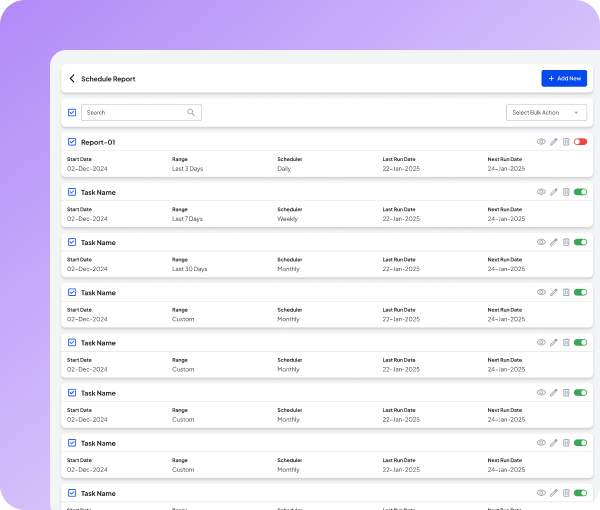
Scheduled Reports without Follow-Ups
Schedule reports to be sent periodically to selected users in Excel, PDF, or Word format. Stakeholders receive recurring information on time without HR preparing and circulating it each.
Data Security and Governance
Keep Employee Data Controlled, Traceable, and Protected
factoHR controls who can view employee information, routes important updates through review, and maintains the history HR needs to answer audit questions.
Access Based on Responsibility
Define granular permissions so employees, managers, and HR teams access only the employee information relevant to their responsibilities.
Review Before Records Change
Route employee data updates through maker-checker approvals before they are stored permanently. HR reduces rework and keeps changes properly authorized.
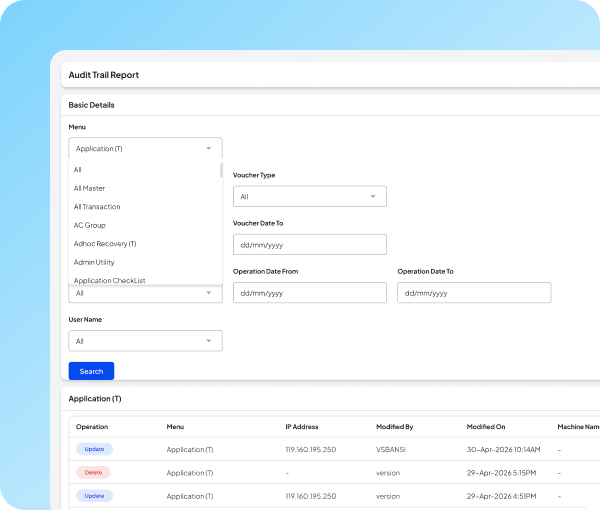
Complete Revision and Audit History
Compare previous and revised employee information with timestamps, and see who made each change and when. HR gets one traceable record for internal reviews and audit questions.
Protected Access Across Devices
Multi-factor authentication and encrypted data transmission help protect employee and payroll information from unauthorized access.
factoHR Helps Teams Work Smarter and Scale Faster

Ms. Pooja Dadhaniya

factoHR has helped us to reduce payroll workforce in half and increased efficiency up to 50% by unifying and streamlining data collection.

4.9
factoHR is one of the few HR software in India that delivers on its promise. Easy to use, mobile-friendly, covering core HR needs from onboarding to payroll.
 Years of HR Expertise
2.7M+
Employees
4000+
Customers
20+
Countries
Connected HR Platform
Extend Core HR across the Employee Lifecycle
Core HR provides the employee data foundation for connected factoHR products, helping your teams reduce repeated updates and keep workforce processes aligned.
Recruitment
Discover, recruit, and onboard the right candidates faster with manpower requisitions, an ATS, AI-powered resume parsing, offer management, and onboarding.


Performance Management
Align workforce goals with your organization’s vision through goals, OKRs, continuous feedback, and 360-degree assessments.

Attendance Management
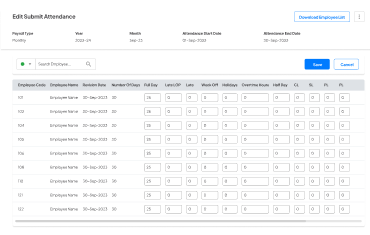
Get more from employees’ time with integrated, touchless time tracking designed for on-site, hybrid, and remote workforces.

Leave Management
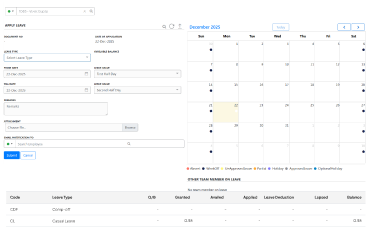
Simplify leave management with configurable policies, automated balance tracking, and faster approvals.

Frequently Asked Questions
What is HR Software?
HR software is a digital solution that automates and streamlines core HR functions, from recruitment and onboarding to payroll, performance management, and offboarding. It enables organizations to manage their workforce efficiently, reduce manual administrative work, and improve compliance and decision-making.
What Reports are Available in factoHR?
factoHR provides these reports:
- Daily attendance reports
- Absence reports
- Payroll reports
- Performance reports
- Recruitment reports
- Employee information reports
Is there a Mobile App?
There is a mobile application of factoHR that works as an Employee Self-Service (ESS) app for both Android and iOS users. Some of its features are:
- Attendance tracking
- Leave management
- Payslip access
- Expense submission
Do factoHR Offer a Free Trial?
Yes, factoHR provides a free trial for its HR software, which companies can request. You can request a free trial or demo through their website.
Can Employees Access Payslips and Policies?
Employees can access/download their payslips and policies through a digital portal. Payslips and policies are made available through the company’s centralized system/dashboard.
Can I Migrate from Spreadsheets or another HRMS?
Organizations can migrate from spreadsheets or other HRMS to factoHR easily. The process involves data mapping, validation, and parallel testing.
What Makes factoHR the Best HRMS Software in India?
factoHR is an AI-powered HRMS software in India with 15+ modules covering the full hire-to-retire lifecycle. Key features include AI facial recognition attendance, multi-state payroll compliance (PF, ESI, PT, TDS), OKR-based performance management, and retirement benefit management. Trusted by 3,500+ companies including Hitachi and L&T.
How Long does HRMS Implementation Take?
HRMS implementation timelines vary based on company size. factoHR typically takes 2-4 weeks for small businesses and 6-8 weeks for enterprises needing customization. A dedicated implementation team supports you through the process.
How is Pricing Structured?
There is a tiered pricing structure. The pricing models are:
- Core plan: ₹4,999/Monthly (Up to 50 Employees)
- Premium plan: ₹5,999/Monthly (Up to 50 Employees)
- Ultimate plan: ₹6,999/Monthly (Up to 50 Employees)
Do You Support Multi-Location and Shifts?
factoHR supports multi-location management with location-wise configurations and centralized dashboards. It also supports shift management and tracking of employee work shifts, simplifying overall operations.
Do You Support PF/ESI/PT and TDS Automatically?
factoHR helps organizations support management of key statutory deductions such as PF (Provident Fund), ESI (Employee State Insurance), PT (Professional Tax), and TDS (Tax Deducted at Source). The software can automate recurring deductions, like PF and TDS for payroll, to ensure accurate payroll calculations.
Can We Integrate Biometric Devices and Accounting Tools?
factoHR can integrate with multiple attendance and accounting software. The software offers built-in integration with biometric devices and accounting applications, like Tally and QuickBooks.