
Top 40 Android Developer Interview Questions and Answers 2026: List for Candidates and Recruiters
Table of Contents

Android developer interview questions usually test your understanding of Android basics, app architecture, Kotlin, UI handling, debugging, and performance. Whether you are preparing for your first Android role or hiring experienced talent, knowing the most common questions can help you approach interviews with more confidence.
India has a huge market for smartphone apps, and companies need skilled Android developers to meet growing demand. Finding the right talent is hard without good recruitment software. As a result, both candidates and recruiters need a practical set of questions that reflects real project work. This guide covers 40 Android developer interview questions and answers for 2026, from Activities, Fragments, and Intents to MVVM, Room, WorkManager, Jetpack Compose, and testing. It is useful for candidates, technical interviewers, and recruiters who want clear explanations and practical interview preparation.
What You Will Learn from These Android Developer Interview Questions
- Understand how the Android system runs your code.
- Learn how to explain your technical choices with confidence.
- How to pick the right background tools and data storage options.
- Discover how to talk about app crashes and bug fixes clearly.
- Get answers to common questions candidates and recruiters often ask.
Basic Android Developer Interview Questions
To begin with, these Android developer interview questions focus on the core concepts every candidate should understand before moving to architecture and advanced problem-solving.
1. What is the Android OS and Its Architecture?
Why they ask: They want to know if you understand the platform.
How to answer
Android is an open source platform. It uses a Linux kernel. The architecture has different layers. It starts with the kernel at the bottom. Then it has hardware layers and the Android Runtime. Above that is the Java API framework. System apps sit at the very top.
2. What is Clean Architecture?
Why they ask: This shows you can write code that is easy to test and grow.
How to answer
Clean Architecture splits code into layers. The Presentation layer handles the screen. The Domain layer holds the business rules. The Data layer manages databases and APIs. This keeps everything organized.
3. What is an Activity?
Why they ask: This is a core building block.
How to answer
An Activity is one single screen in your app. A login page is one Activity. Android stacks them up. When you press the back button, it takes you to the last screen.
4. How does the Activity Lifecycle Work?
Why they ask: Bad lifecycle management causes crashes and memory leaks.
How to answer
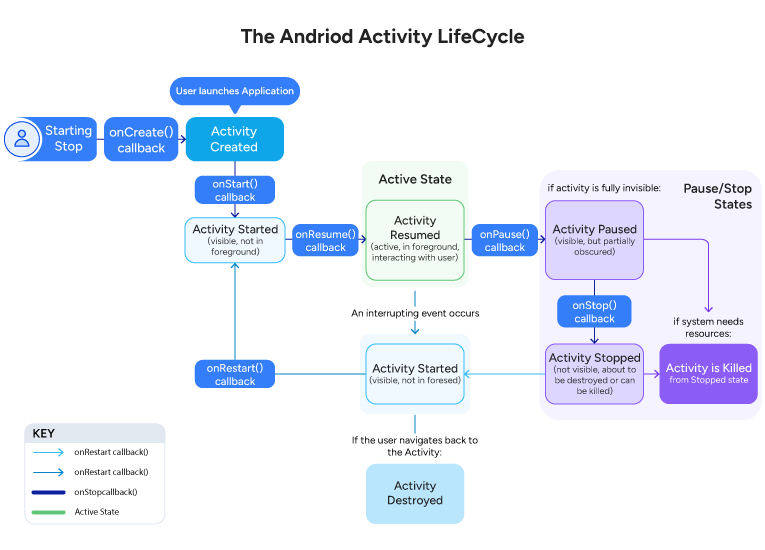
The lifecycle has specific steps. onCreate sets up the screen. onStart makes it visible. onResume makes it ready for the user to touch. onPause happens when you leave. onStop hides it. onDestroy cleans up the memory.
5. What is an Intent?
Why they ask: Intents help different parts of an app talk to each other.
How to answer
An Intent is a message. It asks for an action to happen. An explicit Intent names the exact screen to open. An implicit Intent requests a general action, such as sharing a photo.
6. What are Fragments, and when do You Use Them?
Why they ask: Fragments make apps flexible.
How to answer
Fragments are parts of a screen that you can reuse. You can put two Fragments side by side on a tablet. On a phone, you might just show one at a time. They make it easy to build dynamic screens.
7. What does the AndroidManifest File do?
Why they ask: The manifest is the rulebook for your app.
How to answer
The manifest tells the system everything about the app before it opens. It lists all the screens and services. It also asks for permissions, like using the camera or internet.
8. What is Context in Android?
Why they ask: Using Context the wrong way causes memory leaks.
How to answer
Context gives you access to system resources. Application Context lasts for the whole time the app runs. Activity Context only lasts as long as the screen is open. You use Application Context for databases and Activity Context for UI themes.
9. What is ADB?
Why they ask: They want to know if you use real tools to fix bugs.
How to answer
ADB stands for Android Debug Bridge. It connects your computer to your phone. You can use it to see live crash logs or install apps for testing.
10. What Causes an ANR, and how do You Fix It?
Why they ask: Nobody likes a frozen app.
How to answer
ANR stands for Application Not Responding. This happens if you block the main UI thread for five seconds. You fix it by moving heavy tasks to background threads using Kotlin Coroutines.
11. What is the Difference between Lazy and Lateinit in Kotlin?
Why they ask: They want to see your Kotlin skills.
How to answer
Both delay the creation of an object. You use laziness with val for things that do not change. It only loads when you need it. You use lateinit with var for things that will change. You must give it a value before you use it.
12. Why Use RecyclerView Instead of ListView?
Why they ask: RecyclerView is the modern standard for lists.
How to answer
RecyclerView is much faster. It uses a ViewHolder to recycle list items as you scroll. It also uses DiffUtil to only update the exact items that changed. This saves memory and keeps scrolling smooth.
13. What is a ViewModel?
Why they ask: This is a key part of making stable apps.
How to answer
A ViewModel holds data for a screen. It survives when the user rotates their phone. This means your data does not disappear if the screen changes size or flips.
14. How do Kotlin and Java Compare?
Why they ask: They want to know why you pick one language over the other.
How to answer
Java is fine for old apps. Kotlin is much better for new ones. Kotlin has null safety to prevent crashes. It also has extension functions to add features to existing classes easily. It takes less code to do the same job.
15. What are Sealed Classes in Kotlin?
Why they ask: This shows you know how to handle complex data states.
How to answer
A sealed class restricts the types of subclasses. The compiler knows all the possible options. This is perfect for handling network responses like success, error, or loading.
Intermediate Android Developer Interview Questions
Once the basics are clear, interviewers usually move to architecture, background tasks, local storage, and API handling to assess practical development skills.
16. How does MVVM Architecture Work?
Why do they ask: MVVM is the standard way to build Android apps today.
How to answer
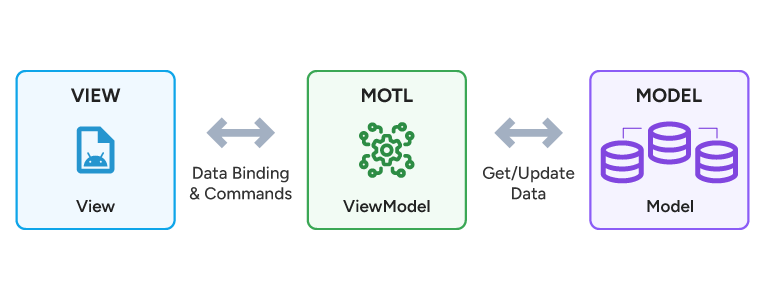
MVVM has three parts. The Model handles the data logic. The View displays the screen. The ViewModel connects the two. The View watches the ViewModel for any updates using LiveData or StateFlow.
17. How is MVVM Different from MVP?
Why they ask: They want to see if you understand app design history.
How to answer
MVP uses a Presenter to tell the View exactly what to do through interfaces. MVVM does not talk to the View directly. Instead, the View just observes the ViewModel. This makes MVVM much easier to test.
18. What does the Repository Pattern do?
Why they ask: This tests how you handle offline caching and data.
How to answer
The Repository sits between the ViewModel and your data. The ViewModel asks the Repository for information. The Repository decides if it should get fresh data from the internet or use offline caching from a local database.
19. How does LiveData Work?
Why they ask: LiveData keeps the UI safe.
How to answer
LiveData holds data that the screen can observe. It is aware of the Activity lifecycle. It only updates the screen when the screen is actually visible. This stops background crashes.
20. What is Room, and how does It Compare to SQLite?
Why they ask: Storing data locally is a common task.
How to answer
SQLite makes you write long database queries by hand. A room is a wrapper that makes it much easier. Room checks your code as you type. It prevents errors before the app even runs.
21. What is the Difference between DataStore and SharedPreferences?
Why they ask: DataStore is the new standard for saving small bits of data.
How to answer
SharedPreferences is old and can block the main thread. DataStore is modern and uses Kotlin Coroutines. It is safer and prevents data corruption. You should use DataStore for all new projects.
22. When do You Use WorkManager?
Why they ask: Background tasks can be tricky.
How to answer
You use WorkManager for jobs that must finish. This includes uploading a file or syncing data. WorkManager makes sure the job runs even if the user closes the app or restarts their phone.
23. What are Services in Android?
Why they ask: Services run in the background.
How to answer
A Foreground Service shows a notification, like a music player. A Background Service runs quietly. A Bound Service connects directly to a screen. Today, we mostly use WorkManager instead of background services.
24. How do You Use Kotlin Coroutines?
Why they ask: Coroutines handle heavy lifting without freezing the app.
How to answer
Coroutines run tasks in the background without blocking the main thread. For network calls, developers usually use the IO dispatcher, while UI updates run on the Main dispatcher. This approach keeps the app responsive and makes asynchronous work easier to manage.
25. What is Retrofit?
Why they ask: Apps need to talk to the internet.
How to answer
Retrofit is a tool that connects your app to web APIs. You create an interface with the web addresses. Retrofit turns those addresses into actual network calls inside a coroutine.
26. How does Jetpack Navigation Work?
Why they ask: Modern apps use a single Activity and swap out Fragments.
How to answer
Jetpack Navigation manages how a user moves through your app. It handles the back button perfectly. It uses a visual graph to show exactly how screens connect to each other.
27. What is Jetpack Compose?
Why they ask: Compose is the new way to build Android screens.
How to answer
Compose replaces old XML files. You build the UI using Kotlin functions. When the data changes, Compose automatically redraws the screen. It is much faster and requires less code.
28. How do You Handle App Permissions?
Why they ask: Android protects user privacy.
How to answer
You must ask the user for sensitive permissions while they use the app. If they say no, you must handle it gracefully. You should tell them why you need the camera or location before you ask.
29. What is Dependency Injection with Hilt?
Why they ask: Large apps need organized code.
How to answer
Dependency Injection gives a class the tools it needs from the outside. You do not build them inside the class. Hilt is a library that does this for you automatically. It makes testing very easy.
30. How do You Load Long Lists of Data?
Why they ask: Loading everything at once crashes the app.
How to answer
I use Jetpack Paging. It loads a small chunk of data at a time. As the user scrolls down, it fetches the next chunk. This saves memory and keeps the app running fast.
Advanced Android Developer Interview Questions
At the senior level, Android developer interview questions focus more on performance, security, debugging, maintainability, and real production challenges.
31. How do You Optimize an Android App?
Why they ask: Fast apps keep users happy.
How to answer
I use the Android Studio Profiler first. I look for spikes in memory or CPU usage. I move heavy tasks to background threads. I also make sure images are sized correctly so they do not eat up RAM.
32. How do You Find a Memory Leak?
Why they ask: Memory leaks eventually crash the app.
How to answer
I use a tool called LeakCanary. It watches the app while I test it. If an old screen does not get deleted from memory, LeakCanary shows me the exact line of code causing the problem.
33. How do Kotlin Flows Compare to LiveData?
Why they ask: Flow is a powerful tool for complex data.
How to answer
LiveData is great for simple UI updates. Kotlin Flow is better for complex streams of data. Flow has more tools to filter and combine data. You can use StateFlow to replace LiveData completely.
34. How do You Keep Coroutines Safe?
Why they ask: Runaway background tasks drain the battery.
How to answer
I tie every coroutine to a specific scope. If the user leaves a screen, the ViewModelScope cancels the coroutine instantly. This stops the app from downloading data that no one will see.
35. Why Use a Multi-Module Architecture?
Why they ask: Huge apps take too long to build.
How to answer
I split the app into smaller feature modules. If I only change the search screen, the compiler only rebuilds the search module. This makes building the app much faster for the whole team.
36. Have You Built Custom Views?
Why they ask: Sometimes standard buttons are not enough.
How to answer
Yes. I try to only redraw the view when something actually changes. I avoid creating new objects inside the draw function because it runs many times a second. In Compose, I use the built in animation tools.
37. How do You Secure User Data?
Why they ask: Security is critical for banking or shopping apps.
How to answer
I use the Android Keystore to hold encryption keys safely. I use EncryptedSharedPreferences to hide sensitive user data. If the app needs extra security, I use the BiometricPrompt API for fingerprint login.
38. What is ProGuard?
Why they ask: This stops people from stealing your code.
How to answer
ProGuard shrinks the size of your app. It removes code you do not use. It also scrambles your code so hackers cannot easily read it or copy your hard work.
39. What is Your Testing Plan?
Why they ask: Good developers test their own code.
How to answer
I focus heavily on unit tests. I test my logic using mock data. I added a few integration tests to check my database. I only use UI tests for the most important user paths, like the checkout process.
40. How do You Move an Old App to Jetpack Compose?
Why they ask: Most companies are in the middle of this change.
How to answer
I do it one piece at a time. I leave old screens alone if they work fine. When I build a new screen, I use Compose. I use ComposeView to easily drop new elements into existing XML screens.
Android Developer Interview Questions: 10 Tips for Your Interview
Preparation Tips
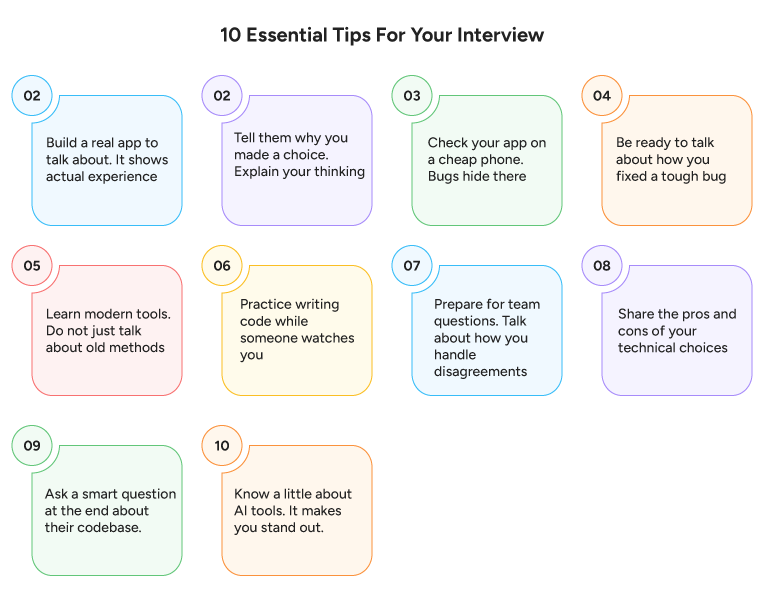
- Build a real app to talk about. It shows actual experience.
- Tell them why you made a choice. Explain your thinking.
- Check your app on a cheap phone. Bugs hide there.
- Be ready to talk about how you fixed a tough bug.
Technical Interview Tips
- Learn modern tools. Do not just talk about old methods.
- Practice writing code while someone watches you.
- Share the pros and cons of your technical choices.
- Know a little about AI tools. It makes you stand out.
Communication and Closing Tips
- Prepare for team questions. Talk about how you handle disagreements.
- Ask a smart question at the end about their codebase.
Conclusion
These Android developer interview questions cover the core topics companies test in 2026, from Android architecture and Kotlin to UI development, background tasks, debugging, and testing. If you want to perform well in interviews, use this list to revise important concepts, explain your decisions clearly, and connect your answers to real project experience. In the end, strong preparation comes from combining technical knowledge with practical examples.
Once you hire the right person, make sure you use employee onboarding software to ensure they have a great first day.
Looking for more tech roles? Check out our guide on Python interview questions and answers.
Finally, here are a few common follow-up questions candidates and recruiters often ask after reviewing Android developer interview questions.
FAQs on Android Developer Interview Questions
What topics come up most often in Android developer interview questions?
Expect questions on MVVM architecture, Coroutines, and Jetpack Compose. They want to know how these tools work together.
Do Android developer interview questions still include XML layouts?
Yes. Many big apps still use them. You need to know how to fix old code and write new Compose code.
Why are Coroutines Important?
They keep the app smooth. They handle background tasks easily without freezing the main screen.
Is Jetpack Compose Required Now?
Yes. Most teams use it for new features. It is much faster to write than old XML files.
What Testing Skills do I Need?
You should know how to write unit tests for your logic. You should also know how to use mock data to simulate network calls.


Grow your business with factoHR today
Focus on the significant decision-making tasks, transfer all your common repetitive HR tasks to factoHR and see the things falling into their place.

© 2026 Copyright factoHR