Trusted by 3,500+ Businesses, Serving over 2.6+ Million Employees
Recognized as India’s best payroll software by HR leaders across industries.
4.9 rating on G2

5 rating on Capterra
Struggling with Payroll? Let factoHR Handle It.
Payroll shouldn’t be stressful. We understand the challenges, and we’ve built factoHR, the best payroll management software in India, to make things easier.
Statutory & Compliance
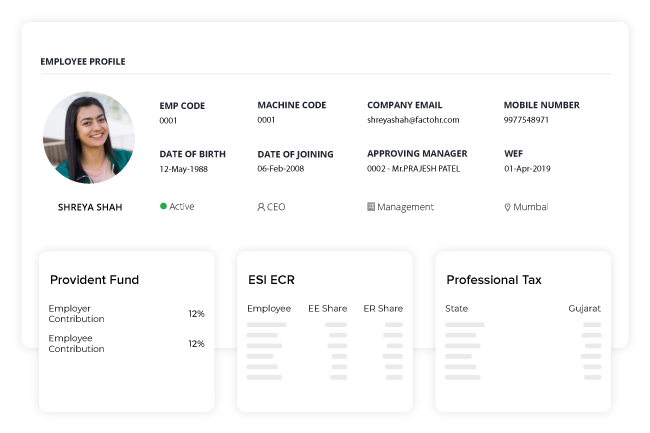
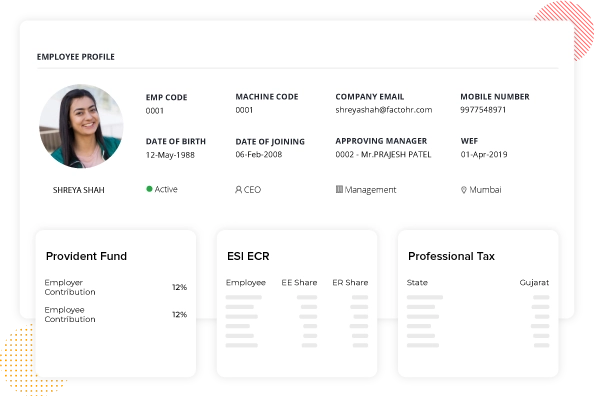
factoHR’s built-in compliance management effectively manages TDS, PF, PT, and ESIC. Rest assured that your filings are both accurate and timely.
factoHR’s Payroll System Features that Deliver Real Business Benefits
Boost efficiency, ensure compliance and simplify every step of payroll.
Mobile App & Ess Portal
Self-Service for the Mobile Workforce
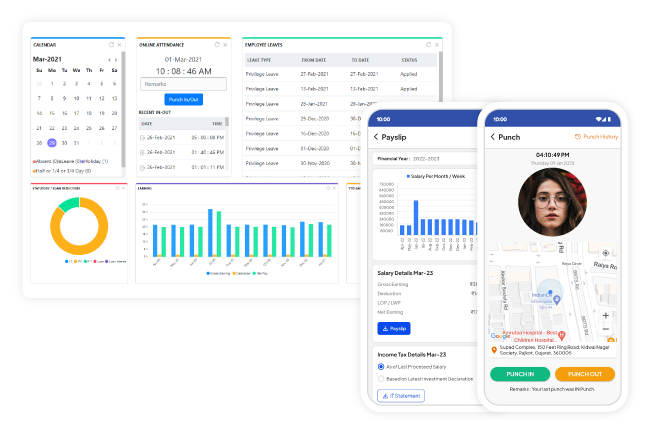
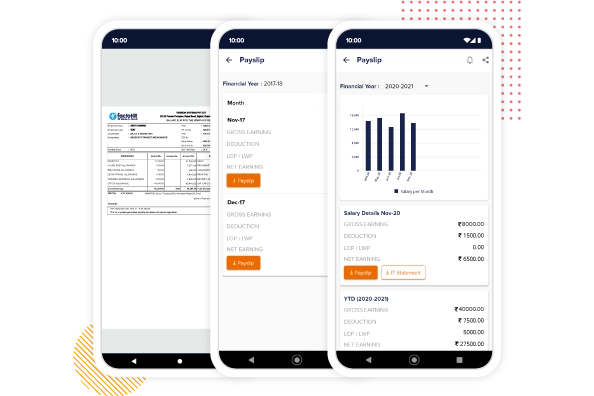
The next-generation mobile app and employee self-service portal allow employees to view compensation, income tax, and other relevant information on their mobile devices and desktops at all times.
View Salary and YTD Earnings
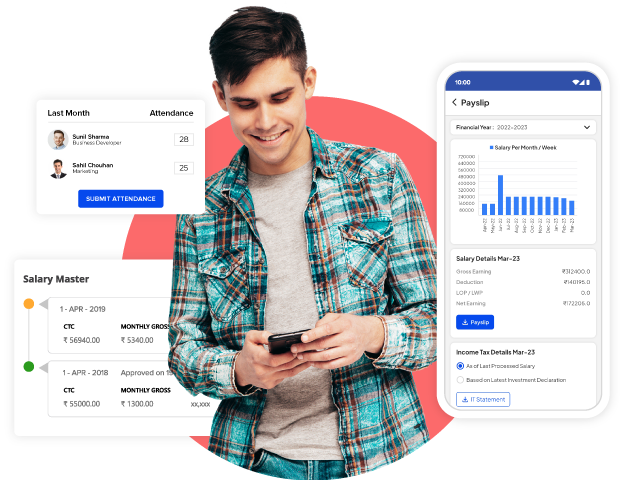
Employees can easily access and view their salary and get a summary of their gross earnings deductions with monthly net income. Also, employees can view their year-to-date earnings in the form of graphs along with the monthly breakup. All this can be done just by logging in to the factoHR’s mobile app or self-service portal in a self-service way.
Download Payslips
Employees can not only view but also download past-year and month payslips in PDF format. factoHR’s payroll software also supports payslips in vernacular language so that your employees do not face any linguistic obstacles in understanding their salary calculation.
Declarations and Exemptions
Employees can choose an old or new regime, view their projected income tax and compare it with the actual deductions, and download statutory forms like 12BB and Form 16 using factoHR’s self-service portal or mobile app.
Flexible Rule Engine
Configure the Process with Ease
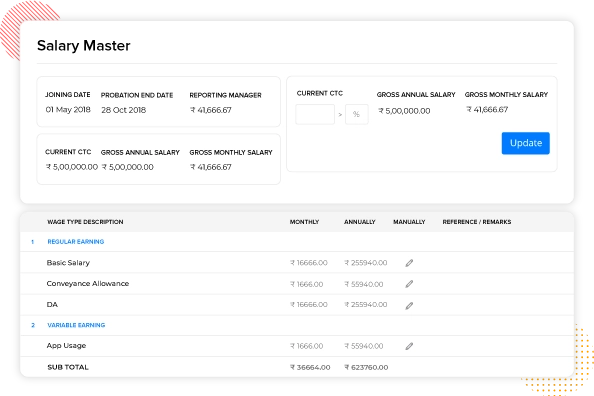
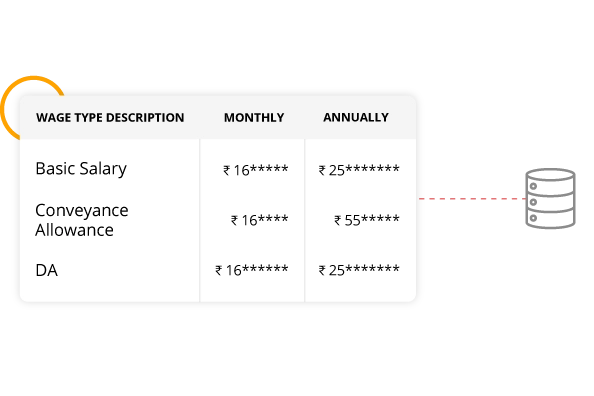
factoHR payroll software’s formula-driven rule engine gives freedom to create unlimited earning or deduction components and flexibility to configure any type of salary structure based on industry or business type.
Create Multiple Payroll Groups
Managers who handle payroll operations can categorize employees into various payroll groups based on their payroll cycle, type, calendar to follow, and location. This makes it easier for HR to process the salary and ensures that no employee is left out or paid twice.
Configure Any Number of Salary Components
factoHR’s payroll management software offers flexibility in enabling the configuration of unlimited salary components. Add the components you want to provide, like basic pay, gratuity, bonus, ESIC, PF, etc. Separately set the calculation type (input) for the CTC structure based on a formula, percentage of total CTC, or fixed amount, along with the payout setup (output) based on pro-rate, not to be paid, or ad hoc amount for each component.
Customize Your Payslip Format
Your organization is not bound to follow a single payslip format that doesn’t fit your requirements. Instead, factoHR offers more than 15 payslip formats that have different layouts and sections, which you can choose as per your organization’s needs.
Data Security
Security by Design
Employee information maintained in factoHR’s Payroll software is stored in ISO-accredited and SOC Type 2-certified cloud data centers. Critical information like compensation data is protected with encryption at rest design.
Backup and Data Management
We conduct data backups every 4 hours, store them in different locations, and retain backup instances for up to a week. In any case of a data crash, the system will recover within 6 hours.
Scalable Architecture
The entire infrastructure of factoHR is built with scalability in mind and deployed on the Azure cloud. It can withstand varied loads of traffic, and it is capable of handling 2000 RPM per application server.
Real-Time System Health Checkup
We run dynamic application server monitoring and perform real-time system health checks with the help of in-house tools. In the case of failures, notification will be sent to relevant stakeholders for immediate action.
Payroll Processing
Run Payroll Quickly
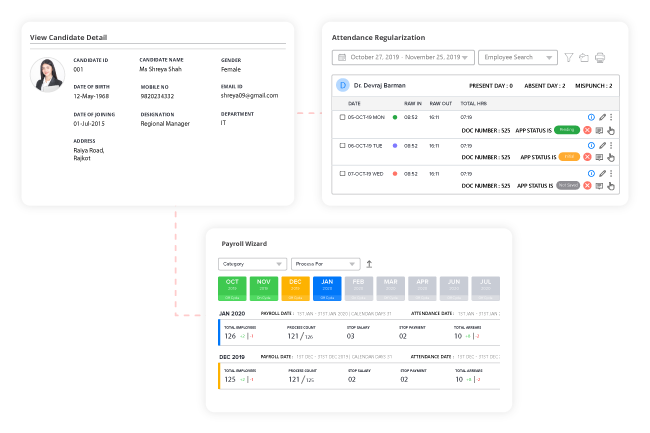
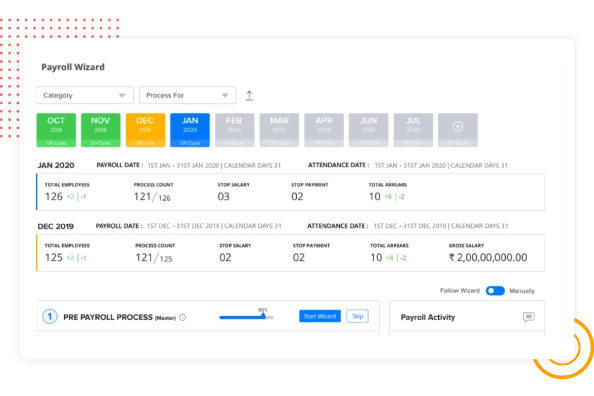
Wizard-driven salary process guides you at every step so you don’t miss any critical payroll input and stay worry-free.
Single-Click Payroll Process
With list-driven process, you are just a click away from salary processing and will never miss out on any step during the pre or post-payroll process.
Off-Cycle Payroll Process
Using off-cycle payroll features, make all the necessary payments that are not part of the regular salary process, like bonuses, incentives, etc. You can even issue off-cycle payslips to employees for whom it is processed.
Accounting Integration
factoHR Payroll Software
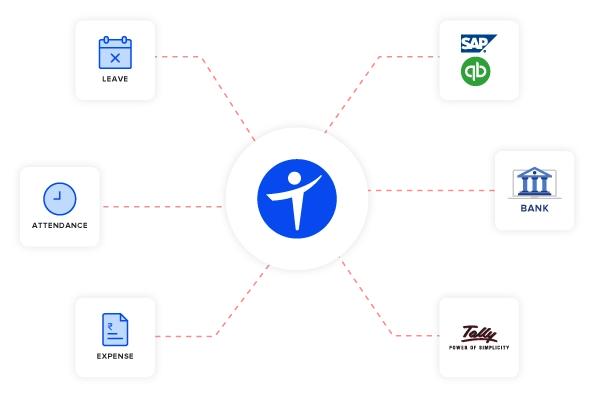
factoHR’s payroll software can cut your payroll processing time by half, where input from internal modules and output to external systems flow seamlessly. factoHR provides built-in integration with internal modules like attendance management, leave, performance and expense management, external systems like banks, ERPs (SAP, Oracle, etc.), and accounting apps (Tally, Quickbook, etc.).
Configure Auto Payroll JV
Using plug-and-play integration features, you can easily integrate with leading accounting system or ERPs and auto-post JV without leaving factoHR. Alternatively, you can export JV details in Excel, XML, or CSV and upload them to your ERP or accounting system.
Bank Integrations and Transfers
Using a connected banking feature, you can directly deposit the salary payments to the employees’ bank accounts without leaving factoHR, or else you can generate bank funding files in the required format and upload via the bank portal.
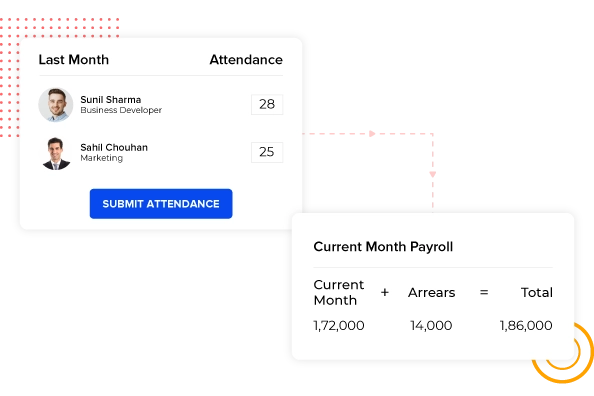
Simplified Salary Arrears
Auto-Arrear Calculation
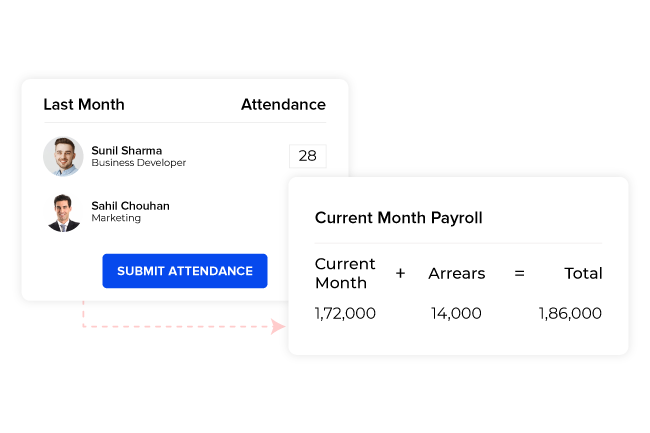
Retro changes or arrears are complex, tedious, and error-prone. Not anymore! factoHR payroll system keeps track of all retroactive changes made in attendance or compensation and automatically calculates statutory and other payments for you so you can stay worry-free.
Supports Various Scenarios
factoHR supports different arrear scenarios like missed attendance, unapproved leave, holidays, unclaimed overtime, and salary revision. Arrear statements can be generated to maintain arrear payment records with various details about particular employees.
Statutory Compliance in Arrear
The statutory calculation and deductions are automatically calculated at the time of arrears payment. The total number of arrears is also displayed so that all the pending payments can be added to the ongoing process and finalized for salary processing.
Statutory Compliance
Stay Ahead of Tax Laws
factoHR Payroll management software takes care of all your payroll compliance requirements, be it PF, ESIC, Professional Tax, TDS, EDLI, etc., with automatic calculation and ready-to-file reports, challans, and forms.
Income Tax
The TDS calculation gets simplified as the system auto-calculates it during salary processing. The employees can also attach proof of their investment declaration, which can be considered for calculation. Also, you can easily generate all types of income tax reports and forms like Form 16, Form 24Q, IT register, IT statement, IT report, and Income Tax Liability report.
Provident Fund
Increase organizational operational efficiency by managing all the activities related to PF funds from a single platform. Configure your PF rules and PF wage components for salary calculations. Also, you can run PF arrears calculations by generating PF challan statements, ECR files, and PF and EPS reports for different payroll types.
Professional Tax
Generate professional tax and labor welfare fund reports and compute Form 5 and Form 5A state-wise as per the rules. With customized options, make complex calculations smooth and easy.
ESIC
Compute the ESI wages of employees for a period of 6 months, along with the calculation of arrears and generating the ESIC report and Form 7. Also, the ESIC file formed is in a format that can be directly uploaded to the ESIC portal.
Push Boundaries
Performance-Linked Payroll Solutions
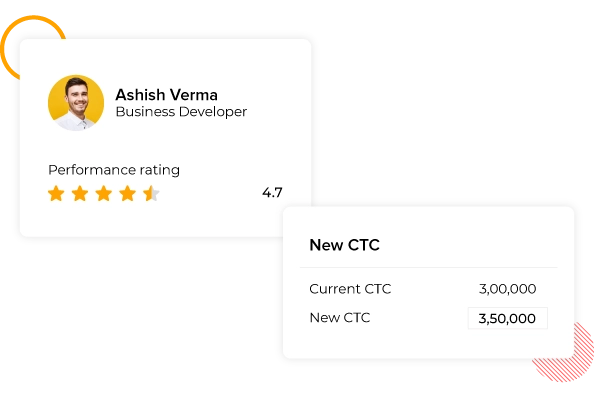
The factoHR payroll system allows you to gauge employees’s performance by linking their goals and KPIs with their compensation. So, you are not just paying an employee’s salary but also tracking their performance.
Incentives Based on Different Performance Parameters
Pay employees according to their performance standards. For example, if a sales executive makes more sales than a specific amount, he will be eligible for a predetermined bonus percentage. First, set the parameters, and then, from Formula Master, configure the formulas for the different kinds of rewards and incentives you want to offer. If the employees work as per the set standards, they will be entitled to the respective incentive, and their salary will be revised based on predefined criteria.
Salary Revision
Keep Trail of Salary Changes
With the factoHR payroll management system, employees can easily revise their salaries by keeping track of every revision. A minute change in compensation can be tracked to who made it and why.
Employer and Employee Convenience
Automate Advance & Loan Management
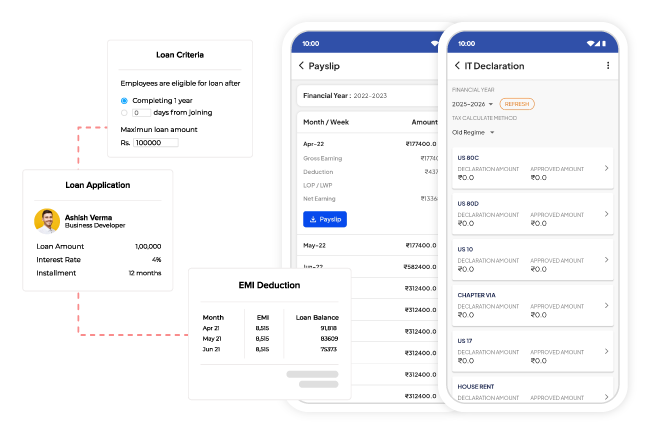
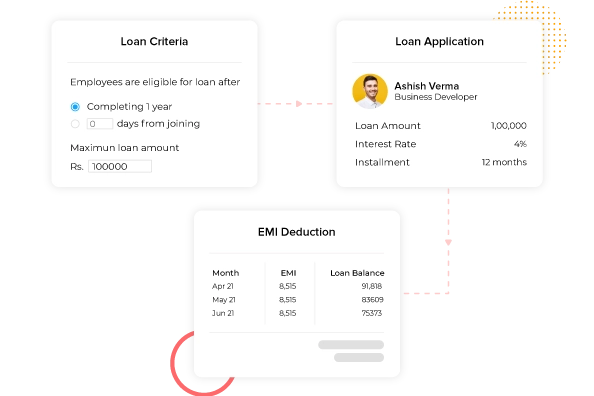
factoHR payroll software allows you to manage the entire advance and loan life cycle, from policy setup to eligibility calculation, auto-EMI deduction, and recovery of pending amounts under one hood.
Maintain Different Types of Loans
Offer your employees various loans, like personal loans, medical loans, or any other type your organization wants to offer. Configure various types of loans and set the loan interest type to be charged.
Loan Disbursement
Set up loan policies and eligibility criteria, and let your employees apply for loans themselves. Once the employee applies for a loan, the managers can reject it, approve it by mentioning the sanctioned amount, and track them till their recovery.
EMI Deductions
Employers can provide flexibility to employees in repaying the loan amount. Set the default interest rates, round off the principal recovery amount, and set the number of EMIs for auto-EMI deductions. Options are also available to stop EMI deductions for a month and carry them forward to the next month. Also, an extra EMI amount or advance payment can be made.
Payslips
Generate & Distribute Payslips in a Snap
With localization support and different formats available, you can generate payslips as per your choice and distribute them on a mobile app, email, or by print.
Be Proactive, Not Reactive
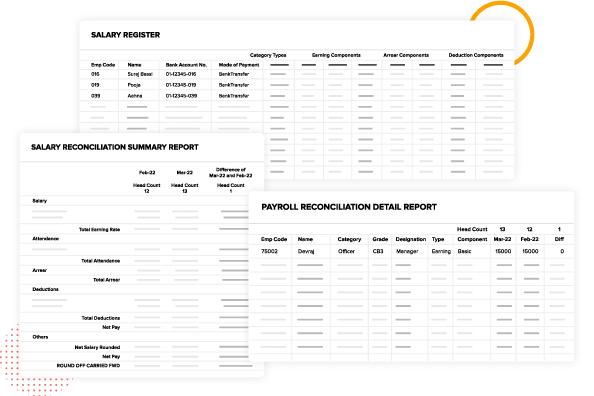
Reports & Analytics
Our 200+ pre-built payroll reports and custom report builder tool empower payroll teams to take data-backed proactive actions that positively impact your company’s bottom line.
Custom Report Builder
With our custom report builder, you can generate reports as per your needs by selecting various data sources, choosing fields or columns you want in the output, applying filters, previewing the report, and exporting it in various formats.
Auto-Report Scheduler
With our auto-report scheduler, reports can be directly emailed to the concerned members at specific dates and times. You can also choose the report output type you want to send, such as PDF, Excel, or Word.
Accelerate Payroll with Built-in System Integrations
Sync Data from HR Modules to Banks and ERPs for Effortless Payroll Processing on factoHR’s Payroll Software.
Experience the Future of Payroll with India’s Most Trusted Payroll Management Software – factoHR
factoHR offers a modern and efficient payroll management software solution that simplifies processes and enhances employee satisfaction.
Effortless Payroll Made Simple
Handle diverse salary structures and unique compensation rules effortlessly with our powerful formula engine.
Automated Compliance, Minimized Risk
Trust factoHR’s end-to-end compliance automation to keep you ahead of regulations without manual efforts.
Payroll in Their Pockets
Our mobile-first ESS portal provides employees with convenient access to their information.
Transparent Value
Enjoy clear and competitive pricing with no hidden surprises, just consistent value.
Payroll, Perfected: Real Results with factoHR
Why Leading Companies Trust factoHR for Payroll Processing.
factoHR is a best payroll software in india it has improved our productivity by 40%. Their hr payroll software allows us
to process payroll on time, with accuracy, and give us ways to direct deposit employees salaries into bank accounts with connected banking for automated payroll and easy payment processing.
Mr. Devanathan Raghavan | Cycle Agarbatti
Flexible Pricing Plans to Fuel Your Growth
Core
Effortlessly Manage HR Tasks and Empower Your Growing Business Today!
₹4,999/Monthly
(Upto 50 Employees)
₹69/Monthly per Additional Employee (Billed Quarterly)
Premium
Most Popular
Best Price-to-Value Plan to Maximize Efficiency and Productivity of Your Workforce!
₹5,999/Monthly
(Upto 50 Employees)
₹89/Monthly per Additional Employee (Billed Quarterly)
Ultimate
Complete HRMS with Everything You Need for Total Workforce Management!
₹6,999/Monthly
(Upto 50 Employees)
₹119/Monthly per Additional Employee (Billed Quarterly)
Payroll is a process through which an organization calculates and distributes employee compensation. It includes salary or wages, statutory deductions (such as taxes and social security), and other benefits. Payroll processing involves tracking working hours, attendance, leaves, and applying relevant deductions. Depending on the organization’s policy, it can be conducted on various schedules—daily, weekly, biweekly, or monthly.
What is Payroll Software?
Payroll software is a digital tool, either cloud-based or on-premises, that automates employee payments and manages all payroll-related data. Morden payroll software streamlines all the different components of payroll, like compliance, deductions, calculations, and distribution. Additionally, payroll software also generates accurate and intuitive reports to monitor the payroll process.
How does Payroll Software Work?
Payroll software automates employee payments, calculates taxes and deductions, ensures compliance, and generates payslips and reports, simplifying the payroll process.
How Much does a Payroll Management Software Cost?
Different payroll management software offers various pricing plans depending on the number of employees and the features required. Most basic payroll software plans cost ₹5 to ₹50 per employee, whereas premium plans could cost anywhere from ₹200 to ₹300 per employee per month.
Why do Businesses Need Payroll Software?
Businesses require automated payroll software to simplify complex payroll procedures and calculations. The primary benefit of having one is that it saves time and reduces manual labor and errors. It also helps organizations stay compliant with local as well as international (if applicable) labor laws.
How is Payroll Software Useful for HR and Employees?
It systematizes all payroll-related processes, saving time and effort. With the help of this software, HR can streamline tasks such as tallying attendance and leaves, calculating salaries, taxes, and other deductions. Employees can also easily access their pay slips and track their salary history.
What Features to Look for in Payroll Software?
When choosing a right software for your organization, look for key payroll software features such as automated calculations, compliance management, direct deposit, tax filing, time tracking, employee self-service, integrations, and real-time reporting.
How to Select the Best Payroll Software in India?
To select the best payroll software in India, look for software that offers automated calculations, compliance with Indian laws, seamless integration, scalability, employee self-service (ESS), and reliable support. Match these features to your business’s size and industry needs, and compare them against all the products available in the market to make an informed decision.
How Much does factoHR’s Payroll Software Cost?
factoHR’s core plan starts at ₹4,999 per month for up to 50 employees. This plan includes basic HRMS modules, such as payroll software. Additional employees can be added to the plan at ₹69 per month per employee. You can also request custom quotes based on the features you need and the size of your team.
How do I Switch from My Current Payroll Software to factoHR?
Switching from your existing payroll methods, such as manual or other software, to factoHR is easy and can be done in just four simple steps.
Moreover, payroll can also be classified on the basis of payroll cycle (monthly, biweekly, weekly, or daily).
How Secure are Cloud-Based Payroll Systems?
Cloud-based software is typically very secure because vendors employ numerous security measures, including end-to-end encryption, often supported by ISO 27001 and SOC Type 2-certified data centers offered by certain payroll software providers like factoHR. Performing regular backups and enabling strong access controls also help protect sensitive data from cyber fraud and breaches. Despite all the data protection features of such software, companies should always conduct security audits to safeguard payroll data against potential risks.
How to Calculate Payroll?
To calculate payroll, first assess attendance and leave to determine gross pay. Next, deduct statutory and voluntary amounts such as TDS, PT, retirement benefits, and charitable contributions. Finally, net income is calculated, representing each employee’s total monetary compensation.
How to Automate Payroll Processes?
To automate the payroll process, HR professionals need to identify all the bottlenecks of the current method they follow and try to improve them. The easier option is to select an automated payroll software that helps streamline the payroll process by automating tasks that are prone to errors.
How Can the ESS Portal and Mobile App Help with Payroll?
An ESS portal and mobile application simplify the management of certain payroll processes by allowing employees to access their payslips, track taxes, and update personal information. Most modern payroll software, such as factoHR, has a user-friendly interface that minimizes HR’s workload. Additionally, employees can use the portal to apply for leave and access other HR-related information.
Can Payroll Systems Automate Compliance Management?
Yes, payroll systems can automate compliance management to a significant extent. Modern payroll software is often designed with features that help businesses comply with local, state, and federal regulations automatically.
How Accurate is Payroll Software?
Payroll software is highly accurate due to automation, real-time updates, and compliance checks. However, accuracy depends on the quality of the input data and regular audits.
What is the Ideal Example of the Best Indian Payroll Software?
factoHR is India’s leading payroll software, offering automated payroll, compliance, mobile access, seamless integrations, and advanced analytics—trusted by thousands for accuracy, speed, and a superior employee experience.
What Makes factoHR Better than Other Competitors in the Market?
factoHR excels with cutting-edge AI capabilities, effortless mobile accessibility, strong compliance measures, tailored workflows, and extensive payroll automation—all at a competitive price.
Pay Your Team Accurately, on Time, Every Time
Join 3,500+ businesses that trust factoHR to automate payroll tasks and enhance efficiency.