
Workforce Management: What is WFM? Meaning and Guide
Table of Contents

Have you ever wondered why some teams are better organized and always have the right resources? Do you also rely on spreadsheets to verify attendance data? If yes, then workforce management is the solution for you.
WFM is a set of processes and systems that help HR allocate resources and improve a team’s productivity. From startups to growing businesses, employers are relying on WFM software to connect attendance, payroll, leave, shift scheduling, and performance in one place.
Whether you are a business owner or an HR professional who wants to improve your team’s productivity, this guide has the answers. Read on to learn how it works and start improving your processes with our WFM checklist.
Key Takeaways
- Workforce management (WFM) is how HR teams plan, track, and support employees across attendance, hours, leave, shifts, payroll inputs, and productivity.
- There are four stages in the WFM process: forecasting, scheduling, real-time management, and reporting.
- WFM software automates these tasks and gives data in real time.
- WFM tools help you reduce manual errors and simplify all aspects of employee management, including attendance, payroll, compliance, and shift scheduling.
- WFM benefits all industries, including retail, manufacturing, IT, healthcare, and others. It also improves productivity for distributed teams.
What is Workforce Management (WFM)?
Workforce management is a set of processes and systems that help HR optimize resources and improve a team’s productivity by matching the right tools and skills with the business needs. Also known as WFM, it links employee productivity to factors such as time worked, attendance, scheduling, leave, payroll, and analytics.
The key point is that it is both a process and a system. As a process, it is the routine of planning and tracking work. As a system, it is the software that manages the routine and holds the data in one place.

Workforce Management Meaning in HR
From an HR operations point of view, the meaning is simple. It is how HR keeps track of who is available and how many hours they work. It also includes the leave they take, the shifts they cover, and the team’s productivity.
Done well, the process helps you avoid compliance penalties and improves your decisions with analytical and strategic insights into your team’s work time.
What does WFM Actually do?
WFM typically handles these functions:
- Tracks employee attendance across different shifts, teams, and in-office and remote work arrangements.
- Manages work hours and overtime.
- Plans shifts, tracks leave, and absence.
- Supports payroll data accuracy by connecting attendance, shift scheduling, and leave with payroll.
- Measures productivity against expected output.
- Manages compliance records, including statutory items like PF, ESI, PT, TDS, and overtime rules.
- Supports workforce planning for future demand.
- Provides reports and analytics related to attendance, cost, and productivity, along with employee satisfaction.
Workforce Management Examples by Industry
These functions vary depending on the work being done.
| Industry | What workforce management focuses on |
|---|---|
| Manufacturing | Shift scheduling and accurate attendance across production lines |
| Retail | Staff planning for busy hours and seasonal peaks |
| Healthcare | Leave and shift coverage are so critical that roles remain adequately staffed |
| IT | Timesheet tracking and project-level productivity |
| Field sales | Mobile attendance and task tracking away from any office |
| Hospitality | Roster planning and overtime management |
| Construction | Site attendance and clean payroll inputs for daily wage and contract workers |
| Remote teams | Time tracking and productivity visibility without micromanaging |
As more companies build distributed teams, many are also adopting dedicated practices for a hybrid workforce to keep remote and in-office employees equally productive.
10 Key Components of Workforce Management
- Attendance tracking, including biometric, facial, and geo-based punch-in
- Time tracking for hours worked
- Leave and absence management with real-time updates to balances and approvals.
- Shift scheduling and rostering
- Payroll integration so that attendance and leave are connected with payroll
- Performance tracking against goals and output
- Employee self-service for applying leave, viewing payslips, updating payroll-related information such as tax declarations, and marking and updating attendance
- Workforce analytics for attendance, cost, satisfaction, and productivity trends
- Compliance management for statutory records and rules
- Mobile access for field staff
Managing a Mobile Workforce
Mobile Workforce Management (MWM) includes the strategies and digital systems used to coordinate, track, and support employees who work outside a traditional office. This includes field sales staff, technicians, site supervisors, delivery teams, and hybrid employees. In practice, it means that these individuals need a system that helps them mark attendance, apply for leave, update their payroll information, and check their work from their smart devices.

Workforce Management Process
There are four stages to the workforce management process:
1. Forecasting
Forecasting helps you predict how much work is coming and how many people you need for it.
- Demand analysis looks at expected workload, such as production targets, footfall, ticket volume, or project deadlines.
- Resource calculation converts that demand into the number of staff, roles, required skills and tools, and hours required.
2. Scheduling
Scheduling helps you avoid workforce shortages and makes sure that your clients find the right people they need in peak times.
- Shift optimization matches staff to demand while respecting skills, availability, and cost.
- Scheduling publishes the plan, so everyone knows when and where they work.
3. Real-Time Management
This stage helps you avoid unexpected absences.
- Maintaining tracking checks to see that attendance and shifts match the plan.
- Intraday adjustments handle surprises, such as a sudden absence or a demand spike, by ensuring that other workers are available at that time.
4. Reporting and Analysis
The most important of the four stages, this one shows you which areas need improvement. Specifically:
- KPI review measures attendance, overtime, cost, and productivity against targets.
- Continuous improvement makes those insights relevant to the employees and improves the next cycle.
Top 10 Benefits of WFM for Businesses
- Better workforce visibility.
- Reduced admin burden on HR.
- Improved accuracy in attendance, leave, and payroll.
- Better leave and shift planning.
- Improved employee experience through self-service portals.
- Lower compliance risk of penalties under new labour laws and other statutory regulations related to EPF, ESI, gratuity, and F&F settlement.
- Better productivity tracking against output.
- Faster decision-making from real-time data.
- Stronger workforce planning for future demand.
- Higher employee retention through fair scheduling and transparent leave policies.

Common Challenges in Managing a Workforce
Before software, most of these problems came from manual tracking. Recognizing them is the first step to fixing them.
- Manual tracking errors: Paper registers and spreadsheets that introduce mistakes into attendance data.
- Unplanned absences: Last-minute gaps that leave shifts short-staffed.
- Shift conflicts: Overlapping schedules that result in double-booked staff.
- Payroll mismatches: Attendance and leave records that fail to line up with payroll data.
- Overtime disputes: Tracking gaps that lead to disputed hours.
- Lagging indicators: A lack of real-time visibility, causing operational issues to surface too late.
- Compliance errors: Mistakes in statutory records and working hour calculations.
- Limited visibility: Little insight into what employees are actually working on.
- Remote tracking gaps: Difficulty monitoring hybrid and remote employees.
- Reactive staffing: Poor workforce planning that keeps HR responding instead of preparing.
What is WFM Software?
Workforce management software automates attendance, leave, payroll, performance appraisals, compliance, and talent acquisition.
For example, if you manage these aspects manually, you would only be able to get insights related to that aspect. The software provides analytics that give you a bigger picture across payroll, recruitment, performance, and time-to-productivity. This contributes to better, informed decisions and makes your workforce future-ready.
How to Choose the Right WFM Software
Use this checklist when you compare WFM solutions for your team.
- Attendance and leave features that match your shift and leave policies
- Shift and roster support for your industry
- Payroll integration so attendance flows into payroll cleanly
- Mobile app access for field, deskless, and hybrid staff
- Self-service features for employees and managers
- Reporting and analytics
- Compliance support for your statutory requirements
- Scalability as your headcount grows
- Ease of use,
- Support and implementation quality from the vendor
10 Companies Getting Workforce Optimization Right
Workforce management is a complex process that needs defined, targeted approaches to work. Each problem or aspect requires a different approach depending on the industry. Here are 10 examples of firms that had WFM issues and how they solved them.
- Gap. A retail firm that improved scheduling by giving early notice for shifts. Sales rose 7%, and labour productivity rose 5%.
- Walmart. Another retail firm is facing scheduling issues. It introduced “core hours,” where staff worked the same shifts for 13 weeks. Absenteeism fell 11%, and turnover fell 14%.
- Starbucks. Faced backlash over chaotic, back-to-back shifts. It banned the practice and gave three weeks’ notice on schedules. Retention and hours per employee improved.
- IKEA. Struggled with a high quit rate, over 22%. It lets staff set their own shift preferences and swap shifts freely. The quit rate dropped to 17.5%.
- Southwest Airlines. Its crew scheduling system failed during a storm, cancelling thousands of flights. It rebuilt the system and recovery tools. Regulators later confirmed the fix worked.
- West Hertfordshire NHS Trust. Agency staffing costs had climbed to £4.9 million. It prioritised internal staff over agency hires. Agency spending fell 45% in a year.
- Maidstone and Tunbridge Wells NHS Trust. An old rostering tool kept double-booking doctors. A new system plus an internal staff pool filled 240,000 shift hours and saved over £565,000.
- Croydon Health NHS Trust. Believed the ED was understaffed. It found the real issue was inflated staffing requests. Fixing this raised the nurse fill rate to 98%.
- Tata Steel. Could not track 70,000 contract workers across shifts. It added RFID-based tracking for real-time visibility and compliance.
- UPS. Drivers distrusted software-planned routes. It made routes explainable and tracked driver adoption. Drivers now drive 6 to 8 fewer miles a day.

Streamline Workforce Management Processes with factoHR
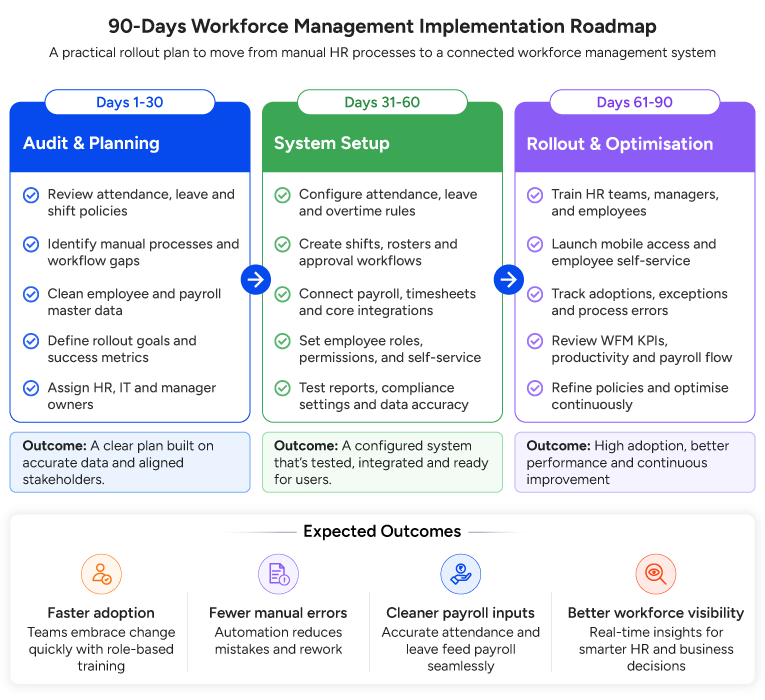
Once an organization decides to move beyond manual practices, the goal is to have a single system that manages the entire WFM process. This is where a platform like factoHR is well suited.
factoHR centralizes employee data and automates attendance, including facial and geo-based punch-in for field and deskless teams. It manages leave requests with clear balances and approvals, connects those inputs to payroll so pay runs stay accurate, and tracks timesheets for project work.
Employees and managers get self-service and mobile access, so routine requests and approvals happen on a phone. HR gets real-time reports instead of month-end surprises, managers get better visibility into their teams, and statutory compliance records stay in order. The result is less manual HR work and fewer errors, without stitching separate tools together.
Workforce Management Checklist for HR Teams
Use this checklist to audit your current setup. If you cannot tick most of these, manual tracking is already costing you time.
- Track employee attendance in one place.
- Maintain accurate leave records with balances.
- Plan shifts and schedules ahead of time
- Monitor overtime and flag exceptions
- Connect attendance directly with payroll
- Track productivity against clear expectations
- Enable employee self-service for routine requests
- Use mobile access for field and hybrid staff
- Review workforce reports regularly
- Check compliance records on a set schedule
FAQs
Workforce Management vs Workforce Planning: What is the Difference?
Workforce management manages the workforce day to day, covering attendance, shifts, leave, and hours. Workforce planning looks further ahead at what roles, skills, and headcount the business will need. WFM handles day-to-day tasks, while workforce planning shapes long-term strategies, and each depends on the other.
Workforce Management vs HRMS: How do They Relate?
An HRMS is a broad system for all HR functions, from hiring to exit. Workforce management is the part focused on time, attendance, scheduling, and productivity. In most modern platforms, WFM is a core module inside the wider HRMS rather than a separate tool.
Why does WFM Matter for HR Teams?
It reduces admin burden, improves the team’s productivity, facilitates continuous reviews and feedback, and provides the tools to forecast future needs.
How does WFM Reduce HR’s Workload?
It automates repetitive tasks like attendance capture, leave approvals, and payroll inputs, and lets employees self-serve for routine requests. HR spends less time chasing information and correcting errors.
How does Workforce Management Track Team Availability?
It combines attendance and leave data with the help of a tool and simplifies tracking absenteeism and availability.
How does Workforce Management Improve Productivity?
It improves productivity by providing managers with the tools to review an employee’s performance. It also helps an employee adjust their skills to business needs based on continuous feedback.
When Should Companies Invest in WFM Software?
Firms should start using WFM software when their team grows, and aspects like compliance, payroll, attendance, leave, and performance appraisals are difficult to process on spreadsheets.
How does factoHR Simplify Workforce Management?
factoHR brings attendance, leave, shifts, timesheets, payroll inputs, self-service, and reporting into one platform with mobile access so that HR can manage the entire employee management process from a single system.

Grow your business with factoHR today
Focus on the significant decision-making tasks, transfer all your common repetitive HR tasks to factoHR and see the things falling into their place.